Valheim Interactive World Map Generator — Any Seed, Real-Time (1.0)
Generates in real time in your browser — a reimplementation of the 1.0 world generator. No server, no pre-rendered image.

What this world is made of
Bosses & traders from spawn
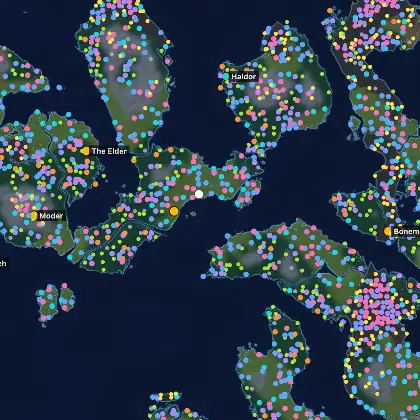
Drag to pan, scroll or double-click to zoom, hover a marker for its name, and click any site for its details. Boss and trader markers open the matching article in a new tab. Keyboard: arrow keys pan, +/− zoom, 0 resets; on touch, pinch to zoom. Markers show where the 1.0 generator places each site for this exact seed.
One finger scrolls the page. Two fingers pan and zoom the map. Double-tap to zoom in, tap a marker for its details.
Type any Valheim seed and generate your exact world in the browser — biomes, the 8 Forsaken bosses, the 3 traders and 12,000+ landmarks, with on-foot distances from spawn. No save file needed; works on console too. 700+ curated seed maps included.
Base placement, before you build
Grade any patch of land before you drop a single wall
Turn on the Base site tool and drag a box over the map. The generator measures the exact terrain under it — so you pick a spot that is flat enough to build on and close to shore, before you ever sail there.
- Elevation
- Slope
- Flat (buildable)
- Shoreline
Popular worlds
Popular worlds
Tried-and-tested seeds — open the map for any of them in one click.
- 4 Boss Walkable MeadowsBlack ForestMountain Open in interactive map
- Copper Farm on the Southern Tip MeadowsBlack ForestMountain Open in interactive map
- 1.0 Small Starter Island MeadowsBlack ForestMountain Open in interactive map
Want more? Browse all 700+ curated seeds
Get new seeds & patch notes by email
A short email when the seed library grows or a Valheim patch changes the world. No spam — unsubscribe anytime.
How the world works
What is always true in every world
Valheim’s world is generated from a seed — biome positions and the distances between them change from world to world, and there is no fixed ring or spiral. But the structure below holds in every 1.0 world.
- You always spawn on a Meadows landmass.
- Each Forsaken boss has its altar in its own biome — Eikthyr (Meadows), The Elder (Black Forest), Bonemass (Swamp), Moder (Mountain), Yagluth (Plains), The Queen (Mistlands), Fader (Ashlands).
- The Deep North is the farthest biome, reached by sea after the Ashlands.
- Biome positions and distances vary per seed — for a specific world, use the seed map library below.
How it works
How to use the interactive world map
This is a real-time Valheim world map generator, not a static image. Type the exact seed string of any world (the one shown beside it on the “Create world” screen) and the page reconstructs that world right in your browser — terrain, the eight biomes, every boss altar, the three traders and thousands of other landmarks. Because it runs the same 1.0 world generator the game uses, the layout matches the world you will actually get.
- Find your seed. Open Valheim, choose “Create world”, and read the seed shown next to the world name. It is case-sensitive — HHcLC5acQt and hhclc5acqt are two different worlds. Any seed works, including the classic 0.
- Generate the world. Type that seed above and press Generate. The map is built locally in your browser in a few seconds — nothing is uploaded and no save file is opened, so it also works on consoles where mods and save files cannot be used.
- Read it. Pan and zoom to any part of the world — drag with a mouse, or two fingers on a touch screen — and select a marker to read its name, its distance from spawn and its coordinates. The World panel lists each biome’s share of the map and which bosses and traders you can reach on foot from spawn.
- Switch views. Toggle between four map views: Biomes (coloured regions), Terrain (relief shading with contour lines), Height (hillshade only — the shape of the land) and Contour (topographic lines only). Add cloud cover, go fullscreen, or copy a share link that re-opens this exact world from its seed.
What the markers mean
Every marker on the map, explained
The generator places each of these site types from the same 1.0 world rules that your own save uses. Toggle them on the map, or read the list here.
- Spawn
- Your starting point — always a Meadows beach.
- Boss
- Forsaken boss altar; one exists per boss in every world.
- Trader
- One of the three traders: Haldor, Hildir, the Bog Witch.
- Crypt
- Underground dungeon entrance, opened with the previous boss key.
- Camp
- Small abandoned camp with container loot.
- Cave
- Natural cave mouth leading to underground tunnels.
- Mine
- Mine entrance — scrap ore and trolls.
- Fortress
- Large hostile structure with higher-tier loot.
- Runestone
- Runestone that reveals its biome on your map when read.
- Ruin
- Surface ruin — a scattered, destroyed structure.
- Village
- Generated village or settlement cluster.
- Shipwreck
- Shipwreck, on the coast or under water.
- Monument
- Landmark structure rather than a functional site.
- Resource node
- Resource cluster worth farming for a build.
- Mystery site
- Unclassified generated site, flagged for a look.
Location entries
Every location the map can place, with its world-gen rules
95 entries, each one a page of placement rules measured over 600 generated worlds: copies per world, biome and altitude it demands, spacing, footprint and how far the nearest copy sits from spawn.
Spawn
Runestone
Ruin
Village
Shipwreck
Monument
Resource node
Progression route
Eight biomes, one route
Valheim gates progress biome by biome. Follow the path from the Meadows to Deep North — each node names the Forsaken boss that guards it, plus the boss drop that opens the next biome. Open a biome to read its guide.
- Meadows Boss Eikthyr Boss drop Hard Antler Black Forest
- Black Forest Boss The Elder Boss drop Swamp Key Swamp
- Swamp Boss Bonemass Boss drop Wishbone Mountain
- Mountain Boss Moder Boss drop Dragon Tear Plains
- Plains Boss Yagluth Boss drop Torn Spirit Mistlands
- Mistlands Boss The Queen Boss drop Majestic Carapace Ashlands
- Ashlands Boss Fader Boss drop Fader Relic Deep North
- Deep North Boss Kall Fimbulbringer
Warm end = starter biomes, cold end = late game. Nodes without a guide yet are marked as pending.
Traders
Where the traders wait
The three traders each live in a fixed biome. Haldor (Black Forest), Hildir (Swamp) and the Bog Witch (Swamp) — they only move when you ask.
Real maps, per world
Every world looks different
Because the layout is seed-generated, the honest map of your world is the one rendered from its seed. The seed map library has 700+ pre-rendered 1.0 worlds with bosses, traders and biomes marked.
Limits
What this map deliberately does not draw
The generator places structures and biomes. It does not place life or resources, so the markers here are a precise picture of where the world is, and a deliberately silent one on everything the generator leaves to the game.
- No creatures — trolls, wolves, deathsquitoes and everything else spawn by rules, not by coordinate, so a marker for them would be fiction.
- No trees, ore, stone or berry bushes — the surface is a resource field the game regrows as you harvest it, not a fixed layout.
- Nothing inside a dungeon, camp or village — the map shows where the crypt or tar pit sits, not what is inside it.
- No Maypole or other event pieces — those are things you build, not structures the generator places, so they have no marker here.
The same seed can draw a different world depending on when you started
Valheim has shipped three sets of world-generation rules — versions 0, 1 and 2. A seed you typed in 2021 was built by a different ruleset than the same seed today: coast, islands and dungeon layout can all move. Every world on this site is generated by the current 1.0 ruleset, so it matches a fresh world you start right now — but an older save may not match its own seed page.
Valheim world map — frequently asked questions
Is the Valheim world map the same for every seed?
No. Valheim generates each world’s biome positions, boss stone locations and trader spawns from its seed, so the map is different every world. What stays fixed is the structure: you always spawn in the Meadows, each Forsaken boss has its own biome, and the Deep North is the farthest out. For a specific world’s layout, type its seed into the generator above.
What does seed 0 mean in Valheim?
Entering 0 as a seed does not mean “random” — it is the literal integer 0, which produces one specific, reproducible world. The generator has a Random world button for a fresh one-click seed, and you can also type any arbitrary string (a date, a phone number, a word) into the seed field to get a varied world.
What are the different Valheim map views (biomes, terrain, height, contour)?
The interactive map has four views, switchable without regenerating the world: Biomes shows the coloured biome regions; Terrain adds relief shading and contour lines; Height is hillshade only, so you read the shape of the land without the line noise; and Contour is the topographic line work alone. You can also toggle drifting cloud cover, go fullscreen, and copy a share link in the form /map/?seed=… that re-opens that exact world for anyone who opens it.
How do I see a Valheim seed’s map before creating the world?
Type the seed into the interactive generator on this page and the exact world is drawn in your browser with bosses, traders and biomes marked. For a ready-made shortlist, the seed map library holds 700+ pre-rendered 1.0 worlds, and the seed finder lists worlds where a set number of bosses are reachable on foot.
Does the Valheim world map need a save file?
No. The generator rebuilds a world purely from its seed string using a reimplementation of the game’s 1.0 world generator, entirely in your browser. It never reads or asks for a save file, which is exactly why it also works on console — you only need the seed shown on the “Create world” screen.
Is the generated map accurate compared to the in-game map?
Yes, for everything the world generator places. Terrain, biomes and all fixed structures (boss altars, traders, ruins, crypts, etc.) match the world you will get. The only differences are things the generator does not decide — creature spawns and the exact state of loot — and minor map-style choices, so the layout you plan against here is the layout you will find in game.
Does the Valheim world map work on Xbox, PlayStation and Switch?
Yes. Consoles cannot run mods or open save files, but typing a seed in by hand works the same on every platform — and this generator only ever needs that seed string. Open this page in the console’s browser and generate your world from the seed you typed into the game.