Patch-tracked guide
Valheim Console Commands (1.0) — Full List & How to Enable Cheats
Valheim console commands: open console, enable devcommands cheats, full reference: spawn, god, fly, debugmode, time, weather, skills, admin.
By Valheim Field Guide Editorial Team
Before you start
Three things to know:
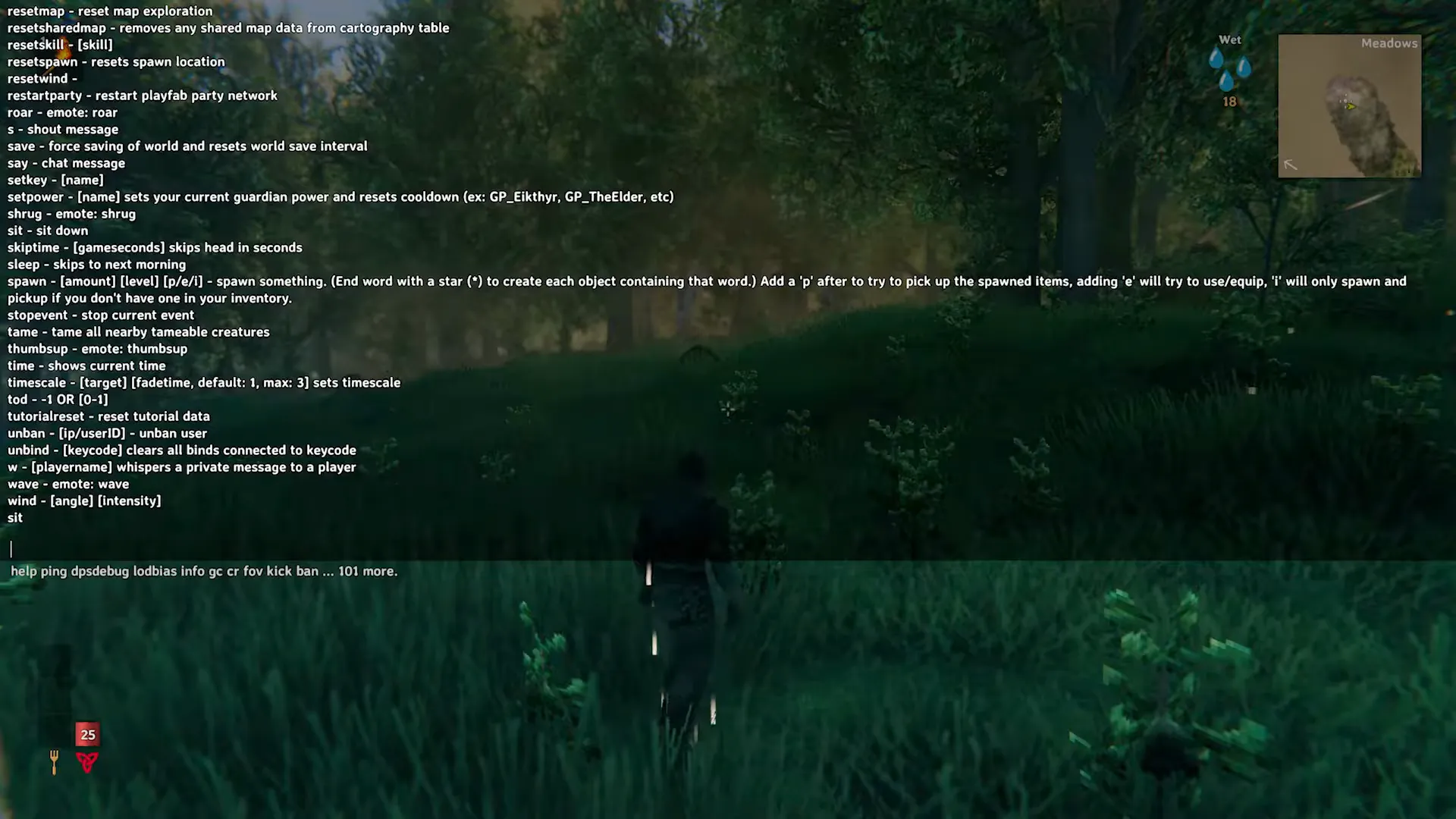
- Cheats are opt-in. Since build 0.148.6, cheat commands are disabled by default; you enable them per session with
devcommands. - Single-player only. Cheats do not work in multiplayer sessions. Server admins have a separate command set (below).
- Back up your world. The world lives in
.dband.fwlfiles.spawn,raiseskillanddebugmodeall change a save permanently.
Using cheat commands (anything behind
devcommands) marks your character and world and disables the 1.0 achievements — confirmed in Iron Gate’s 1.0 notes and the 1.0.12 hotfix, which also adds theyes i used devcommands but i want my achievements anywayopt-in (no spaces) to restore eligibility. Camera-only commands such asfreeflyare not treated as cheats. See the achievements list for the full details.
Movement and invulnerability
| Command | Effect |
|---|---|
god |
Toggle invulnerability |
ghost |
Toggle ghost mode — enemies ignore you |
fly |
Toggle flight for your character |
freefly |
Detached camera that flies independently of your character |
nocost |
Toggle free building — pieces cost no materials |
Health, skills and creatures
| Command | Effect |
|---|---|
heal |
Restore your health to full |
puke |
Empty your food slots (removes current food buffs) |
raiseskill [skill] [amount] |
Add levels to a skill |
resetskill [skill] |
Remove levels from a skill |
tame |
Tame nearby tamable creatures |
killall |
Kill all nearby creatures |
Spawning items
spawn [item] [amount] [level]Item names are the internal IDs and are case-sensitive, so spawn Wood 50 works and spawn wood 50 generally does not. The level argument sets quality. Useful for testing a build, screenshotting a base with nocost, or recovering after a lost cargo run.
debugmode — four cheats in one
debugmode enables a bundle of developer tools with hotkeys:
| Key | Effect while debugmode is on |
|---|---|
Z |
Fly |
K |
Kill all nearby enemies |
L |
Loot drops from nearby enemies |
B |
Free building — no material cost, no build-radius limit |
Run debugmode again to turn it off. B is the one base builders use: it removes both the material cost and the workbench radius restriction.
Time, weather and map
| Command | Effect |
|---|---|
tod [0-1] |
Set the time of day; tod -1 restores normal time flow |
skiptime [seconds] |
Advances in-game time by the specified number of seconds |
env [weather] |
Force a weather/environment state (clear, rain, storm, fog and similar) |
wind [direction] [intensity] |
Set wind direction and strength |
exploremap |
Reveal the entire map |
pos |
Print your current coordinates |
goto [x] [z] |
Teleport to coordinates |
Coordinates come from pos or from the map. Use goto with care in the Mountains and Mistlands — arriving at a coordinate puts you at that point without checking what is around it.
Events and raids
| Command | Effect |
|---|---|
event [name] |
Trigger a named raid event |
stopevent |
End the currently running event |
Pair these with the raids world modifier if you want raids permanently changed rather than triggered once — see World Modifiers.
Server admin commands
These work on dedicated servers and are separate from cheats:
| Command | Effect |
|---|---|
kick [name/ip/userid] |
Remove a player from the server |
ban [name/ip/userid] |
Ban a player |
unban [name/ip/userid] |
Lift a ban |
banned |
List currently banned players |
For server setup, ports and hosting options: dedicated server guide.
Legitimate alternatives to cheating
Console commands are fine for testing and for recovering a lost cargo run, but they remove the progression loop that makes Valheim work. If the goal is a friendlier game rather than free items, World Modifiers get you there properly: raise resources, lower raids, soften combat and deathpenalty — no console, and the world still plays like Valheim.
Related
- Tuning the world instead of the save: World Modifiers
- What the free-build mode is worth using on: base design ideas
- Station upgrade pieces you would otherwise farm: workstations
FAQ
How to enable cheats valheim?
Cheats are opt-in. Since build 0.148.6, cheat commands are disabled by default; you enable them per session with devcommands.
How to use commands in valheim?
Console commands are fine for testing and for recovering a lost cargo run, but they remove the progression loop that makes Valheim work. If the goal is a friendlier game rather than free items, World Modifiers get you there properly: raise resources, lower raids, soften combat and deathpenalty — no console, and the world still plays like Valheim.

Found this helpful? Support the wiki ☕
Buy me a coffeeFrequently asked questions
- Do console commands disable achievements in Valheim?
- Yes, for cheat commands. Iron Gate's 1.0 notes confirm that using devcommands (or mods) marks your character and world and disables achievements; the 1.0.12 hotfix adds the opt-in command 'yes i used devcommands but i want my achievements anyway' (no spaces) to restore eligibility. Camera-only commands such as freefly do not count as cheats. See the achievements page for the full details.
- Can I use cheats on a multiplayer server?
- No. Cheat commands are not available in multiplayer sessions — devcommands and the commands behind it only work in single-player worlds. Server admins get their own separate set: kick, ban, unban and banned.
- The console opens but commands do nothing. Why?
- Almost always because devcommands has not been run in this session, or the -console launch option is missing. Check both, then re-open the console with F5.
- How do I undo a command?
- Most have a reverse form: god and ghost toggle off by running the same command again, tod -1 restores normal time, stopevent ends an active raid, resetskill removes skill levels, and nocost toggles free building off. Spawned items cannot be un-spawned — delete them or start a fresh world.
Patches that touched this guide
- Patch 1.0.14 — keybinding and accessibility options, GPU optimisations, and a long bug-fix sweep
The first large post-launch patch: new keyboard rebinding and accessibility options, a batch of GPU and shadow optimisations, plus fixes across multiplayer saving, terrain modification, Deep North battleaxes, the Ballista and several achievements.
17 Sept 2026
The patch notes themselves are in English.
Related guides
- Do Old Valheim Seeds Still Work After a Version Update? Re-check Your Seed Map & Seed Viewer
Same seed, same seed map — until a patch changes worldgen. What version updates do to your save, how to preview your world again with a seed viewer, and how to re-verify the seeds you trust.
Verified Valheim 1.0 - Valheim Seed Map & World Seed Generator — Preview Any World Before You Load It
Preview your world with a Valheim seed map or world seed generator before you load it: how seed generation works, what a seed viewer shows, how to share seeds, and what seed 0 means.
Verified Valheim 1.0 - Valheim Biomes & Spawns (1.0) — Creature List per Biome
Every Valheim biome and the creatures that spawn there, generated from the 1.0 creature data — bosses and mobs per region.
Verified Valheim 1.0
Related in the database
Browse the 1035 items items, creatures and traders in the game database.
Found an error?
If a number, drop, cost or interaction looks wrong in your game, we want to hear about it.